

Free Google Ads Account Review
Send me your 10-digit Customer ID and I'll run 17 checks on your Google Ads account myself.
You get a clear written plan for where your budget can bring in more enquiries.
Nothing changes in the account without your written OK.
- 17 checks, with every change ranked in the order that pays back first
- Free, in writing, by email, with no call needed
- Yours to act on, with or without me
“Working with Chris has been a game-changer for our online presence. His expertise in Google Ads and SEA strategy helped us boost our visibility and at a much better cost-per-click than we were getting before.”
160+ 5-star Google reviews across Australia

Work directly with Chris
Meet Chris →17 checks, starting with these 5.
I run the same 17 checks on every account I take over, and these 5 come first, in the order they pay back. If you'd like to read ahead, I've written up the common reasons ads underperform.
1
Conversion tracking
Whether the account is optimising toward a real enquiry, a form or a call, and whether that action is primary and counting. It comes first because every bid and budget decision takes its lead from this number.
2
Networks and settings
Search only, the right locations, the right schedule, and search partners and Display switched off so the whole budget stays on Google Search. A settings fix is quick to make, so it sits second.
3
Match types and negatives
Where the money is actually going in the search terms report, and whether the match types and negative lists keep it on your work. It needs clean tracking to tell good searches from poor ones, so it follows the first 2.
4
Landing pages
Whether each ad group lands on a page built for that service, and whether the page carries the conversion tag the account needs. Pages take longer to change than settings, so I rank them by the spend going to each.
5
Bidding
Whether the bid strategy fits the conversion history the account has, or is asking Google to be smart with nothing to learn from. It's last because it depends on everything above it being right.
What you get back
A written review of all 17 checks in your inbox within 2 business days of the access coming through: what I found, what I'd change, and the order I'd do it in. Yours to act on, with or without me.
What the written review looks like.
It covers all 17 checks in 5 parts, by email and in plain English, so you can act on it with or without me.
- 1
Part 1: Conversions
What's counted as a conversion, whether each one is a real enquiry, and which ones Google is bidding toward.
- 2
Part 2: Where the spend went
Where the last 30 to 90 days of spend went, with your top search terms by cost and the ones that brought enquiries.
- 3
Part 3: Default settings
Settings Google switches on by default, such as search partners, Display expansion and auto-applied recommendations, and whether each one suits your account.
- 4
Part 4: Landing pages
Each page your ads point to, whether it matches the ad that sends people there, and whether it carries the conversion tag.
- 5
Part 5: The priority list
Every change I'd make, ranked by the money it keeps in your budget, so you know exactly where to start.
How it works.
- 1
Send the form
Your Customer ID, roughly what you spend, and what would make Ads worth it for you.
- 2
Accept my link request
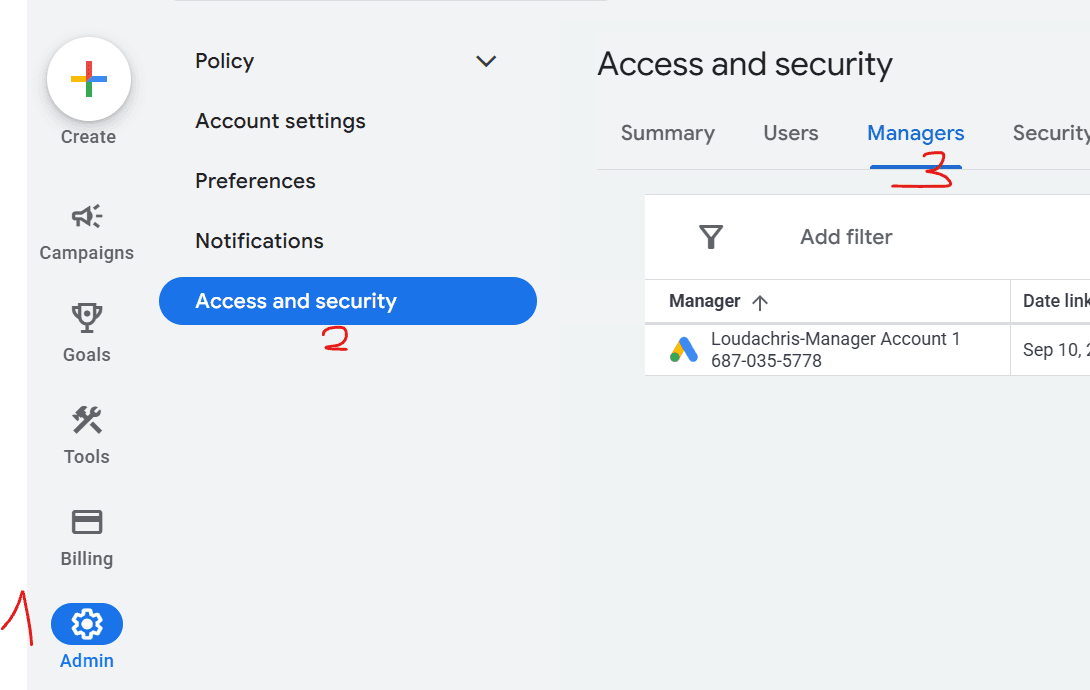
It arrives in Google Ads under Admin, then Access and security, then Managers. 2 clicks. Or add me as a Read only user, whichever you prefer.
- 3
Read the review
Within 2 business days of the access coming through, the written review is in your inbox.
The fixes that pay back first.
The changes I look at first on any account, written as what you gain from each.
Counting the right conversion
Google bids toward whatever the account tells it is a conversion. Pointing it at real enquiries, a form or a call, means every dollar after that is spent chasing the result you want.
Search-only networks
Keeping the campaign on Google Search keeps your budget in front of people actively looking for your service.
Tighter match types and negatives
Exact and phrase match, with a negative list built from your own search terms, keep the spend on the services you sell.
A landing page per service, with the tag on it
A page about the exact service someone searched for gives the click its best chance of becoming an enquiry, and the conversion tag makes sure that enquiry is counted.
A bid strategy that fits your history
Maximise Clicks with a cost-per-click ceiling while the account builds conversion history, then conversion-based bidding once Google has enough data to learn from.
Results from accounts I've managed.
Here are 2 accounts I've run, each shown with its own measure. I've managed 200+ campaigns and $3M+ in ad spend, and I've been Adelaide-based since 2017. If you're in Victoria, see how I work as a Melbourne Google Ads specialist.
Pro Roof and Gutter, Elizabeth South, Adelaide
43.88%
Conversion rate at $42.66 per tracked conversion on the Roof Replacement Search campaign, in the 30 days to 17 July 2026, off a landing page built for that ad traffic. Tracked conversions here are phone calls, form submissions and website phone-link clicks.
More on how I manage Google Ads in Adelaide.
Delidoor, ecommerce
$300K to $1.3M
Annual revenue from Google Ads for an online store, grown with me within 9 months.
In the same 9 months, its monthly revenue from organic SEO grew from $2.5K to $44.5K.
“Spending less with Google Adwords yet giving us more sales leads is already a great return on investment.”
“There are so many people and companies out there that claim to be experts in Google Ads and it can be so hard to determine who actually knows what they're talking about. And then there's Chris. From the minute we engaged his services everything has been clearly communicated and explained and delivered on time.”
What happens after the review.
The review is yours to keep. From there, you choose what happens next.
Fix the easy items yourself
Settings items on the priority list are ones you can change yourself. The full audit checklist walks through each check step by step.
Have me run the account
My Google Ads management is $800+GST a month, month to month, and you pay Google directly for the clicks. It includes a landing page for every service I advertise (1 per campaign), and you can see the landing pages built for ad traffic. For budgets, read what Google Ads costs in Australia. Based in New South Wales? See how I work as a Google Ads agency in Sydney.
Ask me a question first
Use the chat on this page, or call me on 0403 454 199, and I'll answer it myself.
From client emails
What clients have written to me
Client email
“I'm truly thrilled to have this project reach completion and grateful to you Chris for your detailed, professional communication throughout the project. I have learned a lot and I'm pleased we got the right expert for the job!”
Questions about the review.
Where do I find my Customer ID?
What access do you get, and what do you do with it?
What does the review cover?
Do you review Performance Max campaigns?
What if the account's already in good shape?
What spend level is the review for?
How is this different from your audit checklist?
What does it cost?
Do I have to get on a call?
Prefer to talk it through?
The review is the quickest way to get a second pair of eyes on the account, and a call is there when you want one.
Or ask me a question in the chat on this page.
“Engaged Chris to refresh my digital footprint and specifically my ad words campaign. He was professional and very communicative at every step and would highly recommend his services here in Brisbane.”